

OBD2 Scanner: Code Fix Guide
AMA Technology
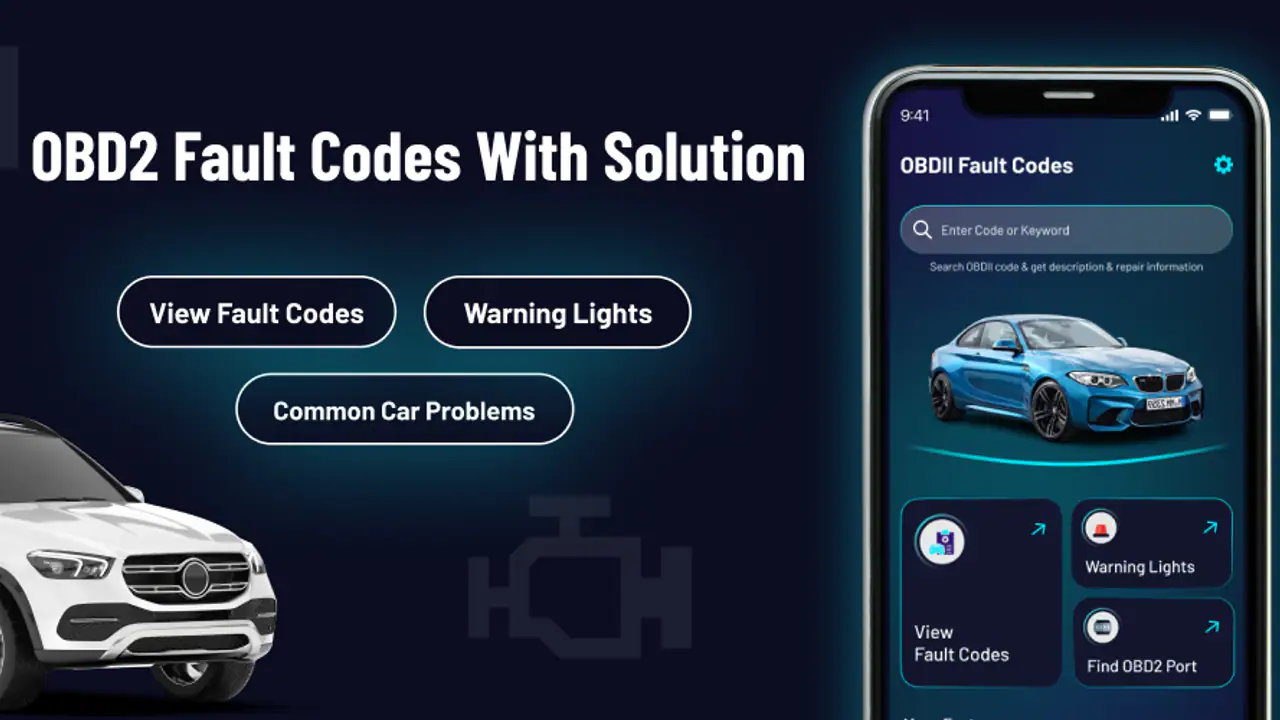
If your dashboard has suddenly lit up with an engine warning symbol, the first problem is often not fixing the car but understanding what the warning might mean. OBD2 Scanner: Code Fix Guide is an Android app in the Auto & Vehicles category that aims to make that first step less intimidating. It focuses on fault-code meanings, possible fixes, and warning-light guidance, so I approached it as a reference tool for the moment when I wanted useful context before deciding what to do next.
My overall impression is that this is best treated as a starting point rather than a complete replacement for a physical diagnostic scanner or a qualified mechanic. That distinction matters. The app can help turn an unfamiliar code into something readable and give you a more informed conversation with a repair shop. It is less suitable if you expect it to connect directly to your car, read live sensor values, or prove that a particular part is defective.
What to expect before you begin
The name may suggest a Bluetooth scanner that communicates with a vehicle, but the store summary describes a guide that works without a scanner. I would therefore install it with the right expectation: it is primarily a lookup and explanation companion. You may use it after obtaining a code elsewhere, or when you need help understanding a warning light before arranging proper testing.
That makes the app useful in a very ordinary situation. Imagine leaving work and seeing the check-engine light on the way home. The car still starts, and nothing obviously feels wrong, but you do not know whether it is safe to drive a short distance or whether you should stop immediately. A guide like this can help you identify the general meaning of a code or warning and prepare sensible questions. It cannot, by itself, inspect the vehicle’s actual condition.
The app is free to install, which lowers the barrier for someone who only needs occasional help. It also carries an Everyone content rating, so its presentation is intended for a broad audience rather than trained technicians only. AMA Technology is the developer, and the app has attracted over ten thousand installs. Its average rating is around 3.1, which tells me to approach it with practical expectations instead of assuming every user will find the experience equally smooth.
Related News

Why WhatsApp Messenger Still Makes Everyday Communication Feel Easy

Jurassic World: The Game Is the Better Dino Tycoon for Strategic Players

Threads in Real Life: Who Should Join, Lurk, or Leave

How SHEIN Turned Shopping Into an Endless Content Feed

How to Make Fortnite Feel Smarter on Mobile

Should You Switch to Microsoft Outlook on Mobile?
The current release is version 1.1.9 and it runs on Android from version 5.1 onward. That broad compatibility is helpful if you keep an older phone in the glovebox or use a spare device for car-related tools. Optional purchases range from under a dollar to several dozen dollars per item, so I would pay attention to what is included before buying anything. The free starting point is the sensible way to judge whether its explanations fit your needs.
What this kind of guide can and cannot tell you
An OBD2 fault code is a clue, not a final diagnosis. A code associated with a sensor, for example, may be caused by wiring, a connector, a vacuum problem, a power issue, or another fault that produces similar symptoms. I found that the most useful way to read an explanation is to treat it as a shortlist of possibilities and a vocabulary lesson, not as permission to replace the first part mentioned.
This is also why the app should not be confused with a workshop scan tool. A physical reader can retrieve the code from the vehicle, while a guide explains what a code generally represents. If you already have a code from a mechanic, a parts store, or a separate scanner, this app has a clear role. If you have no code and want a definite answer from the warning light alone, its role is much narrower.
Gallery
There is a safety difference between a steady warning and a severe driving symptom, but an app cannot make that decision for every vehicle. If the car is shaking badly, losing power, overheating, producing smoke, or showing a flashing warning, I would prioritize stopping safely and seeking professional help over browsing explanations. The guide is most valuable when it supports a careful decision, not when it encourages someone to ignore physical symptoms.
Getting through the first setup
My recommended first step is to install the app before you are standing beside a car in a stressful situation. Open it when you have a few quiet minutes and look at how its information is organized. That small bit of preparation makes a difference because the useful detail is easier to absorb when the warning light is not competing for your attention.
Keep the vehicle handbook nearby if possible. The handbook can explain the manufacturer’s own warning-light behavior, while the app can help with the language of a diagnostic code. These sources answer different questions. The handbook is closer to your specific model; the guide is convenient for translating technical terms into a starting point for further checking.
If the app asks you to choose or enter information, use the exact code rather than a rough description. A code that looks similar at a glance may point to a different system or condition. I would copy the letter and digits carefully, including any leading zero, and then compare the result with the vehicle’s symptoms. This simple habit is more valuable than rushing through several loosely related searches.
Another useful preparation step is to record when the warning appeared. Note whether the engine was cold or warm, whether you had just refueled, and whether the car felt different. If the light disappears later, do not assume the underlying issue has vanished. Your notes can help you compare the app’s explanation with what actually happened and give a mechanic a clearer account.
How I would approach the first lookup
Start with one code or one warning light, not a broad tour of every section. Read the meaning first, then look for the suggested direction of investigation. The goal is to answer three practical questions: what system is involved, what symptoms would make sense, and what level of urgency deserves attention?
I would also take a screenshot or write down the explanation before clearing anything. Clearing a code can remove useful diagnostic history and does not repair the cause. Even if the warning turns off after restarting the car, retaining the original code and the app’s wording gives you a better record than relying on memory.
A less obvious but valuable workflow is to use the app before buying a replacement component. Parts stores and online listings often make a fault-code diagnosis sound more certain than it is. Reading the guide first can remind you that one code may have multiple possible causes. That pause may save money, especially when the expensive part is not the only explanation.
Reaching the first meaningful success
For a first-time user, success is not “the app fixed my car.” Success is understanding what the warning or code is pointing toward and knowing the next responsible action. If I can explain the issue in plain language, identify whether the car has changed behavior, and decide whether to monitor it or arrange inspection, the app has done something useful.
Suppose I receive a code after a fuel stop. I would first confirm that the fuel cap is properly fitted, because a simple issue can sometimes trigger an emissions-related warning. I would then use the app to understand the general system involved, note the date, and avoid immediately ordering a sensor. If the light remains on or returns, I would bring the code and my notes to a technician rather than treating the guide as a final verdict.
That workflow shows where this app fits well. It can reduce the gap between a dashboard symbol and a productive conversation. Instead of saying only “the engine light came on,” I can say when it appeared, what code was reported, what symptoms were present, and what the guide said the system related to. A mechanic may still need to test the vehicle, but the appointment starts with better information.
For someone who already owns a compatible OBD2 reader, the app can serve as a convenient interpretation layer. The reader supplies the code; the guide helps with general meaning and possible directions. I would still compare its explanation with the scanner’s vehicle-specific information and with service documentation when the repair is complex.
A practical roadside decision
Imagine the warning light appears during a short trip, but the car feels normal. I would move somewhere safe, check for obvious signs such as smoke or leaks, and consult the app only after the vehicle is parked. If the explanation suggests a non-immediate issue and the car remains normal, I might arrange a prompt inspection rather than panic. If the vehicle is running poorly or the warning is severe, I would stop using the app as the decision-maker and seek assistance.
This is an important trade-off. The convenience of a phone guide can create false confidence because an explanation feels like an answer. In reality, the same code can behave differently across makes, models, engines, and maintenance histories. I like the app more when it is used to improve judgment than when it is used to justify continued driving.
Common confusion that can slow you down
The biggest source of confusion is the word “scanner.” Without a separate reader or a code already supplied by another source, there may be nothing for a lookup guide to scan in the physical sense. I would not install it expecting the phone to communicate with the car automatically. That expectation is likely to lead to disappointment even if the reference material itself is useful.
Another common mistake is assuming that a code names the failed component. Usually, it identifies a detected condition or a system that needs investigation. For example, a sensor-related code does not automatically mean the sensor should be replaced. Wiring, air leaks, contamination, voltage, and other surrounding problems can produce similar results. The app is more helpful when you read its guidance as a diagnostic direction.
Warning-light color and behavior also matter. A symbol that stays on steadily is not the same situation as one that flashes, and a light accompanied by overheating or severe loss of power deserves more urgency. I would use the app to learn terminology, but I would rely on the vehicle handbook and professional advice for model-specific warnings and immediate safety decisions.
There is also a practical issue with optional purchases. Since in-app items can cost from $0.99 up to $35.99, I would explore the free experience first and check exactly what an upgrade unlocks before confirming payment. A purchase may be worthwhile for someone who regularly researches vehicle faults, but it is harder to justify if you only need one basic explanation. The price range makes that decision personal rather than automatic.
Where the app may feel limited
The average rating of roughly 3.1 suggests a mixed experience, and I can understand why a reference app might divide users. Someone wanting a direct repair answer may find general explanations too broad. Someone expecting live data, code retrieval, or vehicle-specific testing may also feel that the app does not go far enough. Those are not small differences; they define whether this tool matches the job.
I would skip it as my main solution if I need bidirectional controls, sensor graphs, readiness monitors, freeze-frame data, or a confirmed diagnosis. A dedicated scanner and manufacturer-level service information are better choices for those tasks. I would also prefer a mechanic when the vehicle is unsafe to drive, the problem returns repeatedly, or the repair involves systems where a mistake could create a bigger risk.
On the other hand, I would recommend giving it a chance if you are new to car maintenance, have received an unexplained code, or want to avoid walking into a repair conversation without any context. Its value is strongest before the repair decision, when clear terminology and a cautious shortlist can prevent an impulsive purchase.
What I would do after the first lookup
After reading the relevant entry, I would create a simple three-part note: the exact code, the vehicle’s symptoms, and the next check or appointment. This turns the app from something I browse once into a small record of the problem. If the warning returns later, I can compare circumstances instead of starting from zero.
I would then verify the easy, low-risk possibilities that match the explanation, without disconnecting parts or clearing codes just to see what happens. Checking a cap, looking for obvious damage, or confirming a visible connector is different from replacing components based on a guess. The app can help me decide which questions are reasonable; it should not push me into repairs beyond my skill level.
For a recurring issue, the best next step is to take the code and notes to a professional. Tell the technician whether the light was steady or flashing, whether the car drove differently, and whether the warning disappeared. That information can make the app’s general explanation more useful because it is combined with actual vehicle behavior and proper testing.
I also appreciate that the app’s minimum operating requirement is modest, making it practical as a backup reference on an older Android phone. Still, I would keep the important information available offline in my own notes rather than depending on any app at the exact moment I need it. A phone guide is convenient, but preparation is what makes roadside use calmer.
Who will get the most from it?
This is a good fit for a curious driver who wants a plain-language starting point, a used-car owner who is learning basic maintenance vocabulary, or someone who has access to an OBD2 reader but wants help interpreting the result. It can also help a buyer ask better questions when a warning light or historical code comes up during a vehicle inspection.
I would be more cautious recommending it to a professional technician, an advanced hobbyist looking for live diagnostics, or anyone who expects one-tap certainty. Those users will probably get more from a dedicated scan tool, repair database, or manufacturer service platform. The app’s convenience comes from its accessibility, not from replacing every diagnostic instrument.
In the end, I see OBD2 Scanner: Code Fix Guide as a useful first layer between a confusing dashboard warning and a sensible next action. It is free to try, approachable for beginners, and grounded in the practical need to understand fault-code language. Its limits are just as important: it does not turn a phone into a complete vehicle diagnostic system, and its explanations should not override safety symptoms or professional testing.
My recommendation is simple: install it if you want help making sense of a code, use it before spending money on parts, and keep your expectations realistic. Read carefully, record what happened, and treat every result as guidance rather than proof. Used that way, this Auto & Vehicles app can make the first conversation about a warning light much clearer without pretending that a lookup is the same thing as a repair.
FAQs for OBD2 Scanner: Code Fix Guide
What is OBD2 Scanner: Code Fix Guide used for?
OBD2 Scanner: Code Fix Guide is designed to help vehicle owners understand diagnostic trouble codes reported by a car’s onboard diagnostic system. It can provide explanations of common fault codes, possible causes, and suggested repair directions. The app is best viewed as an educational reference and troubleshooting companion, rather than a complete replacement for professional diagnostic equipment or a qualified mechanic.
Can OBD2 Scanner: Code Fix Guide scan my car directly?
The app’s ability to scan a vehicle depends on the version you install and whether it supports a compatible OBD2 adapter or external scanner connection. A phone by itself normally cannot read a vehicle’s diagnostic system. Before downloading, check the app description and compatibility information carefully, because supported adapters, connection methods, vehicle models, and operating systems may vary between Android and iOS versions.
Does the app explain every check-engine light code?
OBD2 Scanner: Code Fix Guide focuses on helping users interpret common OBD2 diagnostic trouble codes, including codes related to the engine, emissions, sensors, and other systems. However, coverage may not be identical for every manufacturer-specific code. A code description is only a starting point, since the same fault can have several causes and may require additional testing with professional tools.
Can I repair my vehicle using the information in this app?
The app can help you understand what a diagnostic code may indicate and suggest areas worth checking, but it should not be treated as a guaranteed repair manual. Vehicle repairs can involve electrical systems, fuel components, airbags, brakes, and other safety-critical parts. If you are inexperienced, if the warning light is flashing, or if the vehicle behaves dangerously, stop driving and consult a qualified technician.
Is OBD2 Scanner: Code Fix Guide free to download and use?
Availability of free features, advertising, subscriptions, or in-app purchases may depend on the current Android or iOS release. Some versions may allow basic code lookup at no cost while reserving additional tools or detailed information for paid access. Review the store listing, permissions, privacy details, and purchase terms before installing so you understand exactly what is included.
Pros
- Simple explanations help beginners understand common OBD2 trouble codes.
- Useful repair guidance can suggest possible causes before visiting a mechanic.
- Compact reference format makes it convenient to consult during car troubleshooting.
- May help users prepare better questions and estimates for a repair shop.
- Can be useful offline if the required code information is stored locally.
Cons
- Coverage may vary by vehicle make
- model
- year
- and engine system.
- Code definitions alone cannot confirm which component is actually faulty.
- Advanced diagnostics may require a separate Bluetooth OBD2 scanner.
- Some recommendations may be too general for complex mechanical problems.
- Users may encounter ads
- locked content
- or limited information in the free version.


